🐙 Tentacle: Distributed Transcoding for Jellyfin
For a whole week every single transcode in my house ran on one machine, while two other machines with perfectly good Intel GPUs sat there doing nothing. No alert fired and I only found out afterwards 🤮.. So I wrote Tentacle, a Jellyfin plugin that spreads ffmpeg jobs across the cluster, and this is the story.
How it was
Jellyfin runs on corellia, one of the nodes of my k3s homelab. mandalore and tatooine are the "satellites": they run the Jellyfin image with Jellyfin itself stripped out and an sshd added. Jellyfin was pointed at rffmpeg, a Python wrapper that pretends to be ffmpeg and runs the real one on a satellite over ssh. All the paths Jellyfin hands to ffmpeg live on NFS, mounted at the same place everywhere, so a transcode running on mandalore writes its segments exactly where Jellyfin expects them.
This setup worked well for a long time, until it didn't.
The week everything ran on corellia
rffmpeg keeps track of who is running what in a SQLite database: it adds a row when a job starts and removes it when the job ends.
The catch? When you seek, or stop playback, Jellyfin kills ffmpeg with Process.Kill(),
which on Linux is a SIGKILL. rffmpeg only traps SIGTERM and SIGINT, so the row never goes
away. After a few seeks both satellites look permanently busy, and since localhost is
never counted as busy, every new job lands on corellia.
From the 26th of September to the 3rd of October that's exactly what happened. Fun, ha? 🤮
There was more:
- No metrics at all. I had already written a Python sidecar, an exporter plus a "reaper" for stale rows, just to see what rffmpeg was doing.
- The SQLite database lived on NFS 🙈.
- Every job paid for a fresh ssh session.
- Nothing checked that the satellites actually matched the server. On the 3rd of October
ffmpeg was
8.1.3on one side and8.1.2on the other.
My first idea was to run several Jellyfin instances behind a load balancer with Postgres. Jellyfin's source said no, because too much of its state lives in memory. Distributing the transcoding is the part that can actually work.
I had to do something!
🐙 Tentacle
Tentacle is a Jellyfin plugin plus one small binary. Workers are called tentacles, because of course they are.
Jellyfin needs a real local process for ffmpeg: it writes to its stdin, reads its stderr
and kills it. There is no way around a stand-in binary. So the tentacle binary is
installed as ffmpeg and asks the plugin, over a unix socket, where the job should run
(the architecture doc has all the gory details):
- Locally: the shim just
execves the real ffmpeg, so Jellyfin can't tell the difference. - Remotely: the broker inside the plugin hands the job to a tentacle's agent, which opens a WebSocket for it and starts ffmpeg. The shim relays everything in between, down to the exit code.
If the broker is missing or slow to answer, the job simply runs locally as if Tentacle wasn't there.
Kill anything, nothing stays behind
This is the rule I care the most about: a job lives exactly as long as its connections. There is no database of running jobs, so there is nothing that can go stale.
When Jellyfin SIGKILLs the shim, the kernel closes its socket and the cleanup ripples down until the agent kills ffmpeg on the tentacle. When a tentacle dies mid-stream, the shim exits with an error and Jellyfin simply restarts the transcode, which lands somewhere else. The soak test does this for minutes under load and then checks that no ffmpeg is left anywhere. It found a pipe leak per job in the agent 😅.
Trust, but verify
rffmpeg assumed the satellites were fine. Tentacle makes each one prove it:
- For every directory ffmpeg writes to, the server writes a random nonce in a file and the tentacle has to echo it back. If the NFS mount is missing, no job using that directory goes there.
- The ffmpeg build must match the server's.
- A GPU self-test is built from Jellyfin's own encoding settings, so a tentacle only gets QSV jobs if QSV actually works there.
The checks run again every 10 minutes and whenever the settings change.
Knowing your GPUs
Each agent finds its GPUs and measures what they can do with one-second encodes and decodes (how GPUs are handled). I pointed a few weird machines at it in "detect only" mode, where they register and show their hardware but never take a job: coruscant with its AMD GPU (busy running llama-server), scarif with no GPU at all, and dagobah, a Raspberry Pi 4 🍓. Watching a Pi show up on the Jellyfin dashboard is weirdly satisfying.
Seeing what happens
This was the whole point. There is a dashboard page inside Jellyfin that shows, for every job, where it ran and why:
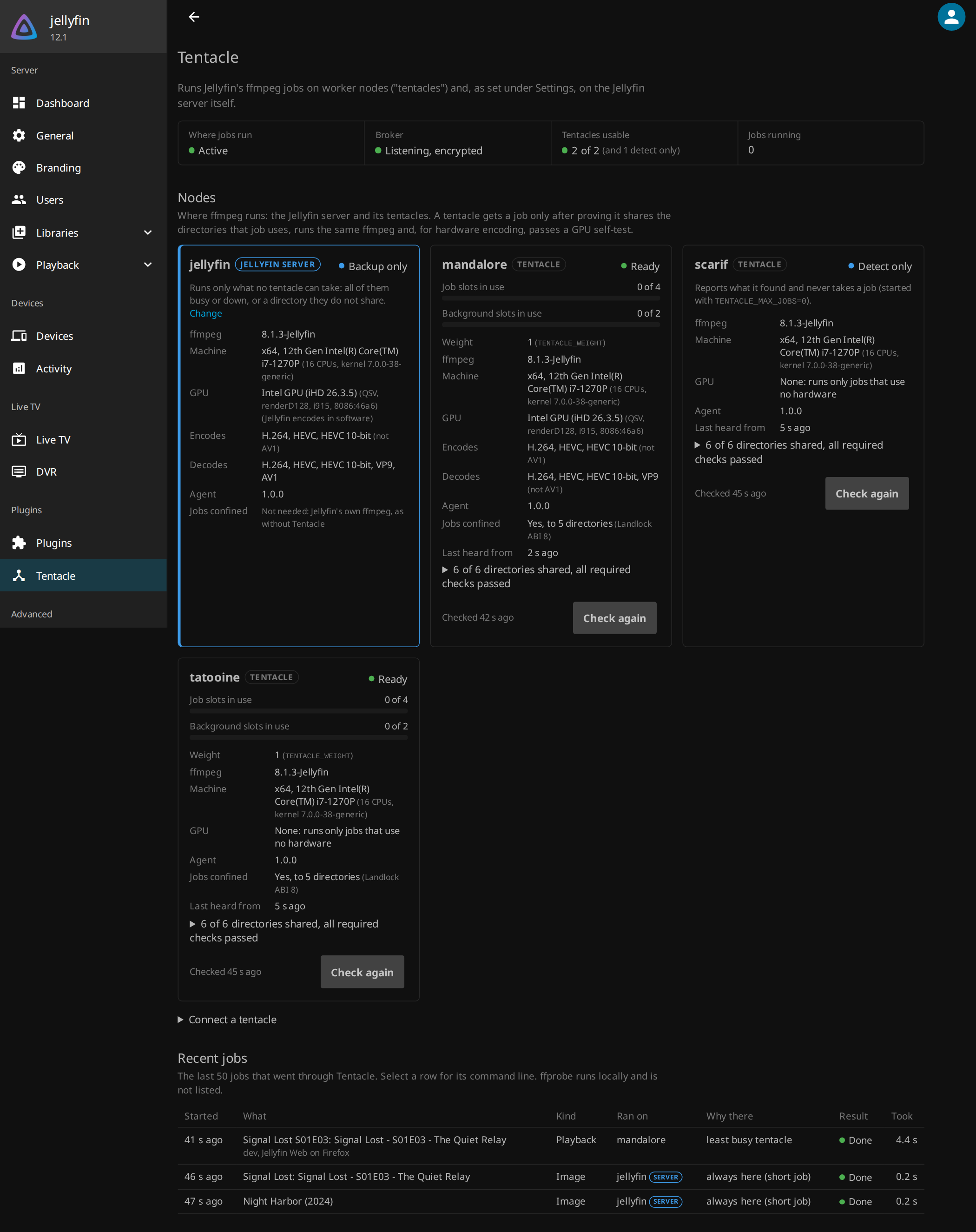
Metrics go straight into Jellyfin's own /metrics, and the repo ships a
Grafana board and
alerts that plug into my
alerting pipeline. The observability doc
lists every metric. The first
one is called TentaclesUnused: tentacles are up and healthy, yet transcodes keep running
on the server. Yes, that is exactly the week I described above. It will never happen
silently again.
Not trusting the server either
The server decides every command line, and an ffmpeg command line can read and write any file the worker's user can. So the agent locks every job into the shared directories with Landlock, and the connection to the server is TLS with a pinned certificate. The security doc goes through the whole threat model.
Installing it
Tentacle ships as two LinuxServer docker mods, and the installation doc walks through the whole thing. The short version, on the server:
  1environment:
  2  DOCKER_MODS: crisidev/tentacle:server-1.0.0
  3  TMPDIR: /config/cache/temp
On each tentacle, the same Jellyfin image with the worker mod and the same shared folders:
  1environment:
  2  DOCKER_MODS: crisidev/tentacle:worker-1.0.0
  3  TENTACLE_BROKER_URL: wss://jellyfin:8097
  4  TENTACLE_BROKER_FINGERPRINT: "AB:CD:...:EF"
  5  TENTACLE_TOKEN_FILE: /run/secrets/tentacle-token
The dashboard gives you the fingerprint and the token. There are complete Docker Compose and Kubernetes examples, and every knob is in the configuration doc. It starts in shadow mode, where it only records where each job would have gone, and when you like what you see you flip it to Active.
The big limitation: your media and Jellyfin's working directories must be on shared storage, at the same paths everywhere (which directories). Hardware transcodes also need a GPU of the same vendor as the server's. Getting Jellyfin to build each command line for whatever GPU the tentacle has is the next big thing on the roadmap, and the plan is already written down.
Thanks rffmpeg 💗
None of this would exist without rffmpeg. It proved remote transcoding for Jellyfin could work and it carried my setup until now. Tentacle is what I learned from its failure modes.
Tentacle is open source and can be found on Github. If something misbehaves, the troubleshooting doc is the place to start, and bug reports from people with NVIDIA and AMD GPUs are very, very welcome 🚀!